Reduce manual work
Move invoice data from the systems your teams already use instead of re-keying every document.

Malaysian e-Invoicing, made operational
Connect your POS, ERP, e-commerce or internal platform to AeCloud. Validate invoice data, submit to MyInvois and monitor every document from one cloud workspace.
From complexity to control
AeCloud sits between your business systems and MyInvois, giving finance and operations teams a reliable path from source transaction to validated e-Invoice.
Move invoice data from the systems your teams already use instead of re-keying every document.
Validate required fields and document data before submission so teams can resolve exceptions faster.
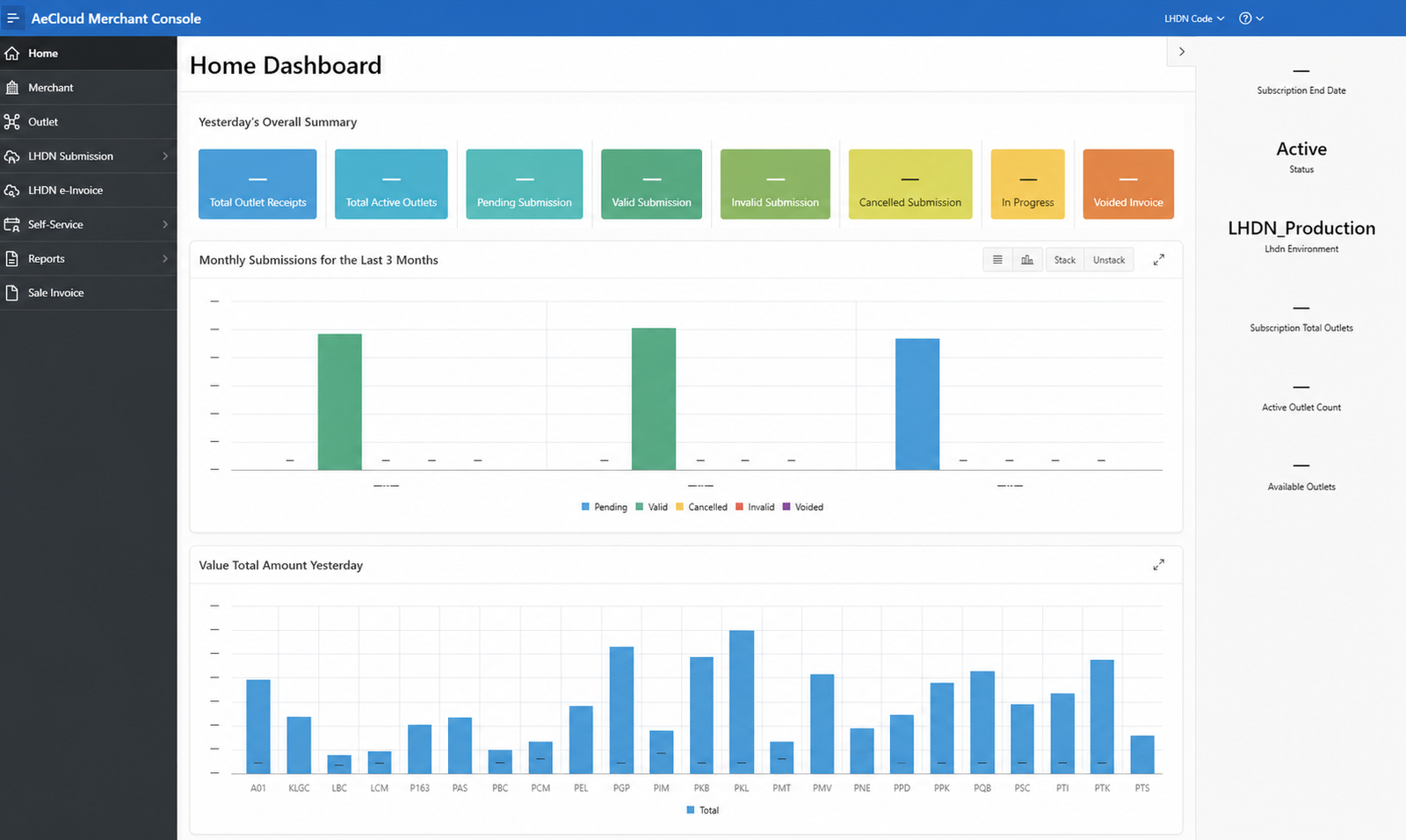
Monitor pending, valid, invalid, cancelled, in-progress and voided documents in one place.
Support multiple outlets, submission preferences, document types and reporting workflows as you grow.
One connected workflow
Keep your source systems. Add a controlled e-Invoice layer around them.
Send data from your POS, ERP, e-commerce platform, Excel workflow or AeCloud portal.
Check document structure, required fields and business data before transmission.
Prepare invoice data for the required MyInvois submission format.
Transmit documents and receive validation responses through the connected workflow.
Track status, investigate exceptions and use reporting for day-to-day control.
Built for real operations
Manage sales invoices, credit notes, debit notes, refund notes and their self-billed equivalents across immediate, scheduled and consolidated workflows.
View document lifecycle →Create documents, maintain products, customers and suppliers, and control submissions without relying on a separate source system.
Merchant guides →Connect business systems through authenticated APIs for master data, validation, submission and document-status workflows.
Integration overview →Monitor invoice activity and submission outcomes across outlets from a central merchant workspace.
Filter, group and review operational data with report views designed for investigation and oversight.
See AeCloud in action
Explore the interfaces merchants and integration teams use to run e-Invoice operations.
Operational overview
Review outlet activity, submission states and recent trends from a single merchant dashboard.
Read the relevant guide →Adaptable by design
Different industries produce invoices differently. AeCloud provides one operational layer without forcing every team into the same source system.
Bring high-volume outlet transactions into immediate or consolidated submission workflows.
Coordinate multiple outlets while preserving familiar front-of-house billing operations.
Connect invoicing and credit-adjustment processes across customers, branches and back-office systems.
Integrate structured documents from ERP and custom production environments through APIs.
Create and monitor invoices through the merchant portal when a full system integration is unnecessary.
Trust built on evidence
Real interfaces, comprehensive documentation and local support—without inflated claims.
Workflows structured around MyInvois submission and response handling.
Middleware and API options for POS, ERP, e-commerce and custom platforms.
Dashboards, status views, reporting and documented lifecycle guidance.
Monday to Friday, 9:00 AM–5:00 PM MYT, excluding public holidays.
Frequently asked
Need a more technical answer? The documentation centre covers the platform in depth.
Browse all documentation →No. AeCloud is designed to operate as an intermediary between supported source systems and MyInvois. The integration approach depends on your current platform and workflow.
AeCloud supports sales invoices, credit notes, debit notes and refund notes, together with the corresponding self-billed document types.
Yes. The merchant self-service area supports document creation and the maintenance of relevant product, customer and supplier records.
Yes. The merchant console provides centralized outlet and document visibility, subject to the configured subscription and access model.
Status views help teams identify pending, invalid, cancelled and other document states so they can investigate and take the appropriate action.
We start with your invoice sources, document volume, outlet structure and preferred submission workflows, then identify the most suitable integration or self-service path.
See it with your own workflow
Tell us how you invoice today. We will focus the conversation on your systems, outlets, document volume and operational priorities.